Solutions

Revenue Operations OS

Run your full revenue engine in one operating system across sales, marketing, and RevOps workflows.

AI Agents for Revenue Teams

Deploy AI agents that execute revenue tasks across prospecting, qualification, and pipeline operations.

Workflow Automation

Automate repetitive GTM workflows end-to-end with orchestration, triggers, and real-time actions.

Lead Generation Automation

Capture and create more qualified pipeline with automated inbound and outbound lead generation flows.

Outreach Automation

Scale personalized multi-step outreach sequences without losing quality or response relevance.

LinkedIn Account Automation

Automate LinkedIn account activity, outreach cadence, and engagement workflows with control.

CRM Automation

Keep CRM data clean, synchronized, and actionable with automated updates and process automation.

Lead Enrichment

Enrich lead records automatically with firmographic and behavioral data to improve conversion rates.

ICP Scoring

Prioritize the highest-fit accounts with dynamic ICP scoring powered by your GTM data.

Agentic Web Crawling & Research

Research the web with autonomous agents that find, structure, and sync intelligence into your systems.

Sales Pipeline Automation

Move deals faster with automated stage progression, reminders, and pipeline orchestration.

Marketing Automation

Automate campaign execution and performance loops across channels to increase marketing output.

Content Management & Publishing

Plan, generate, and publish content workflows from one system with AI-powered execution.

Operations & Workflow Automation

Automate operational handoffs and internal processes across teams with reliability and control.

Customer Success & Support

Support customers proactively with automated follow-up, success playbooks, and retention workflows.

Solutions

With orbitype you get it all

asd

Database settings

Database settings

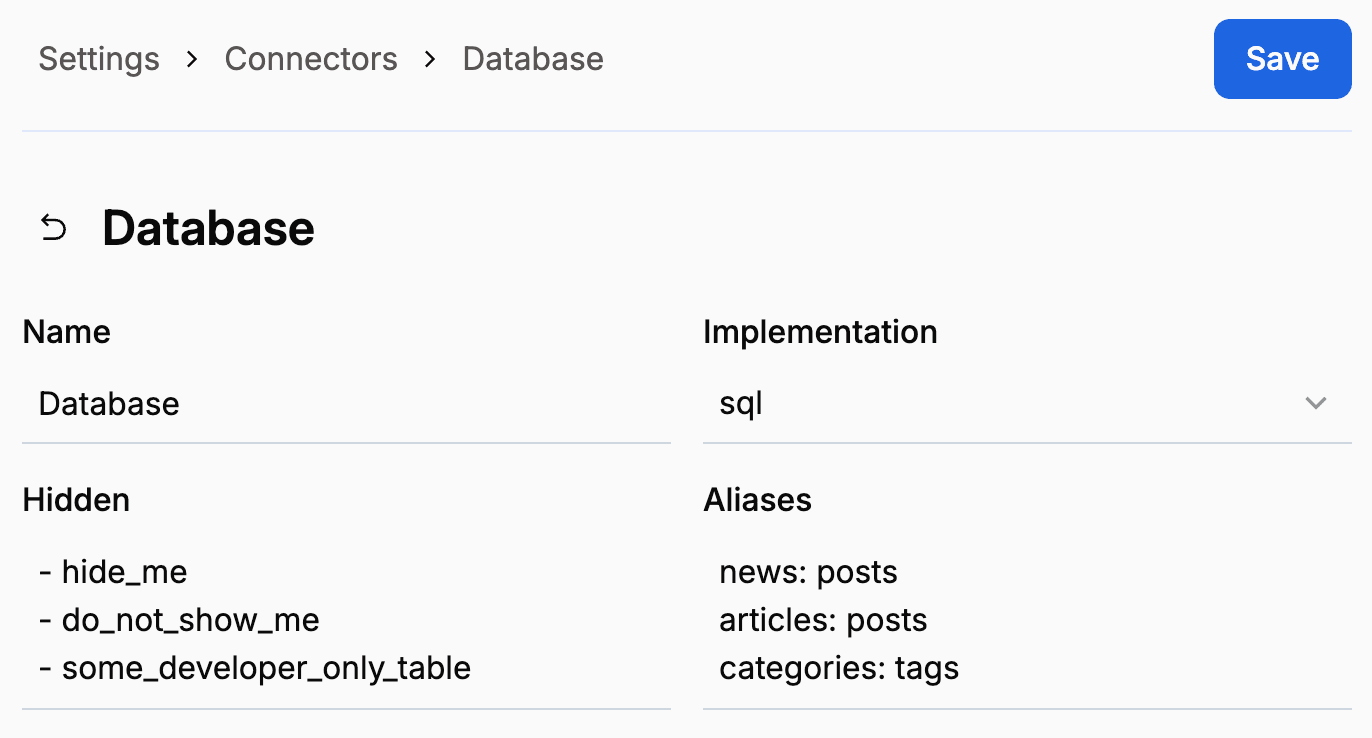
Fine-tune how Orbitype interacts with your database. Among other things, you can hide tables from non-technical users and define aliases.

//

TABLE_OF_CONTENTS

An image of https://s3.eu-central-1.wasabisys.com/orbitype/media/docs/4_4_0__database_settings.png

Hiding tables

If your database includes tables that should not be visible inside Orbitype for whatever reason, simply add them inside the hidden field. Write one table name per line, prefixes with a dash. The syntax follows the YAML array format.

Table aliases

A table may sometimes be referred to by more than one name. For example, the foreign keys admin_id and member_id may both point to a table called users. In such scenarios, you may inform Orbitype of such aliases to ensure that references are correctly resolved.

Simply add one alias per line inside the aliases field. The first value is the original name, the second one the alias. A table can have as many aliases as you want. The syntax follows the YAML object format.

Learn more

SQL wizard

Use the SQL wizard to quickly and easily create database tables. Even without any coding knowledge, you'll be able to create whatever data structure you need.